
When people start and finish work, it affects payroll, shift coverage, and labor-law compliance. On frontline teams, the stakes run higher. One no-show at a factory, warehouse, construction site, or hospitality floor can trigger uncovered shifts, overtime costs, and compliance gaps before lunch. Punch cards and spreadsheets break down fast, especially when most workers never touch a computer during their day.
This guide covers what an attendance tracker is, why accuracy matters, the features that count, the main system types, top tools, and how to roll one out on a frontline team.
TL;DR
- Accurate attendance tracking is the foundation for fair pay, shift coverage, and compliance on frontline teams.
- The strongest systems combine real-time visibility with a call-off audit trail and policy acknowledgment tracking, not just clock-in logs.
- Five main system types exist: manual, punch-or-swipe, biometric or RFID, browser-based apps, and SMS/text-based tools.
- The right fit depends on whether workers have smartphones, reliable connectivity, and a company email.
- SMS-based platforms like Yourco reach every frontline worker, including those without apps, company email, or smartphones.
What Is an Employee Attendance Tracker?
An employee attendance tracker records when each person starts work, takes breaks, and clocks out, giving you an always-current view of who's on the job and for how long. Paper timecards and punch clocks used to handle this. Digital systems now capture the same information instantly and store it securely online.
With trackers, you can monitor absences, paid time off, meal breaks, and overtime hours (and run them through an overtime calculator) in one place. Every entry is automatically time-stamped, removing the guesswork and errors that come with spreadsheets or handwritten logs.
Manual tracking wastes hours and leads to errors. Still, automated systems handle these tasks, send accurate data directly to payroll, and catch issues before they lead to wage disputes or missed overtime thresholds. Many systems also integrate with automated scheduling software and HR platforms, so approved vacation requests automatically appear on schedules and wage calculations run without extra work.
Your tracking method depends on where and how your team works:
- Office employees can log time through a web browser.
- Field crews might text a code from their phone or use a tablet at the job site.
- Remote workers may prefer a desktop timer.
Whichever you pick, the goal is accurate, real-time attendance data that keeps pay correct, maintains compliance, and frees managers to focus on running the team instead of counting hours.
Why Accurate Attendance Tracking Matters
Accurate attendance tracking underpins every frontline workforce decision, from filling an open shift to defending an attendance-point policy in an Americans with Disabilities Act (ADA) review.
According to the World Economic Forum's 2025 Thriving Workplaces report, U.S. employers face roughly $226 billion in annual absenteeism costs, about $1,695 per employee. Frontline industries account for the largest share, as the Bureau of Labor Statistics (BLS) 2024 data show that full-time workers in retail trade have the highest absence rate at 3.4%, and manufacturing and transportation‑related industries close behind.
From an operations standpoint, efficient staffing depends on knowing who actually showed up. Real-time dashboards help managers spot coverage gaps as they arise, shuffle shifts on the fly, and keep overtime in check.
Without that live data, companies overstaff slow periods, scramble to fill no-shows, or pay for hours that were never worked. Automated late-clock-in alerts flag missed punches, so issues get fixed before they drain the budget. Broader labor-tracking solutions help monitor spend across locations.
Compliance gets easier with precise tracking as labor regulations require exact logs for hours worked, rest breaks, and overtime. The Family and Medical Leave Act (FMLA) requires that absence dates be designated as FMLA leave in records and retained for three years.
Points-based attendance systems that don't account for protected absences can also create ADA exposure, since federal enforcement guidance treats modification of a no-fault attendance policy as a potential reasonable accommodation. A system that timestamps every entry and correctly categorizes each absence produces solid documentation for audits or wage disputes.
Clean attendance data also reveals patterns that matter to HR. Consistent call-offs on Fridays, rising no-call-no-shows in a single department, or a spike in mental-health-related leaves all signal issues worth early intervention. Strong analytics let leaders step in (coaching a chronically late team member or adjusting staffing) before morale and retention suffer. According to a Yourco-commissioned survey of 150 HR leaders, 88% say better communication tools can decrease employee churn, and consistent, documented attendance communication is one of the clearest levers available.
This is especially valuable for frontline workers, such as field crews, warehouse workers, and drivers, who often lack access to computers and reliable internet. They need tracking that works wherever they are, whether that's a kiosk by the loading dock or a text message on any phone. When the system meets them where they work, adoption rises, and leaders gain real-time visibility across every location, shift, and job site.
Must-Have Features in An Employee Attendance Tracker
The features below distinguish reliable frontline attendance trackers from shelfware, and several aren't standard in office-focused software.
For more on how to structure call-off documentation specifically, see the call-off hotline approach.
5 Types of Employee Attendance Tracking Systems
Not every workforce needs the same tool. The five system types below can help match technology to the realities of specific sites, budgets, and connectivity.
1. Manual (Spreadsheets, Paper Logs)
Manual tracking is the cheapest option upfront; no setup cost and a near-zero learning curve. Manual logs attract errors and time theft while offering no real-time visibility. HR practitioners who've lived through it describe month-end payroll as a recurring crisis, with leave requests arriving via informal text threads, verbal approvals with no paper trail, and days spent cleaning data before payroll can run. Suitable only for very small teams or temporary projects.
2. Punch Clocks or Swipe Cards
Punch clocks and swipe cards offer a step up in automation. Workers tap or insert their badges, and the machine stamps the time. Cards get lost, and buddy swipes (where one worker clocks in for another) remain a persistent risk. Reporting stays basic, and there's no remote capability for field teams.
3. Biometric and RFID Systems
Biometric and radio-frequency identification (RFID) systems link each punch to a unique physical trait or badge chip, largely eliminating impersonation. Fingerprints, facial recognition, or RFID badges deliver high accuracy and audit-ready records. The catches are upfront hardware cost and occasional privacy pushback. The U.S. Chamber of Commerce recommends pairing these with PIN or photo login fallbacks for field service and construction sites where hardware deployment isn't always practical.
4. Browser-Based and Mobile Apps
Browser-based and mobile apps let staff clock in from laptops, shared tablets, or smartphones. Cloud platforms typically include scheduling, PTO, and analytics features with automatic updates. This flexibility works well for hybrid offices and knowledge workers.
If connectivity drops or workers lack smartphones, adoption stalls. Construction managers specifically flag that manual timesheets become unscalable for crews of 50 or more, particularly when workers rotate across job sites without company-issued devices.
5. SMS and Text-Based Systems
SMS and text-based systems serve crews without reliable data plans or smartphone access. Employees text "IN" or "OUT" from any mobile phone, the system time-stamps the message, and the dashboard updates in seconds. The same channel also handles call-off reporting, policy acknowledgments, and safety alerts, with two-way confirmation so managers know workers received and responded. SMS-based platforms like Yourco also translate messages into 135+ languages and dialects, which removes communication barriers for multilingual teams. This approach reaches even low-connectivity areas, giving managers real-time visibility where app-based trackers fail.
Choosing among these options comes down to the environment. A single storefront might run well on swipe cards. Multiple job sites with multilingual crews managing call-ins, no-call-no-shows, and rotating shifts usually tip the decision toward SMS.
5 Best Employee Attendance Tracker Tools in 2026
The five tools below each solve a different problem: reaching every worker regardless of tech skills, producing defensible reporting for a points-based policy, verifying locations, or consolidating attendance into a full HR suite. The right fit depends on who the workforce is and where tracking currently breaks down.
1. Yourco: SMS-Based Tracking and Frontline Reporting
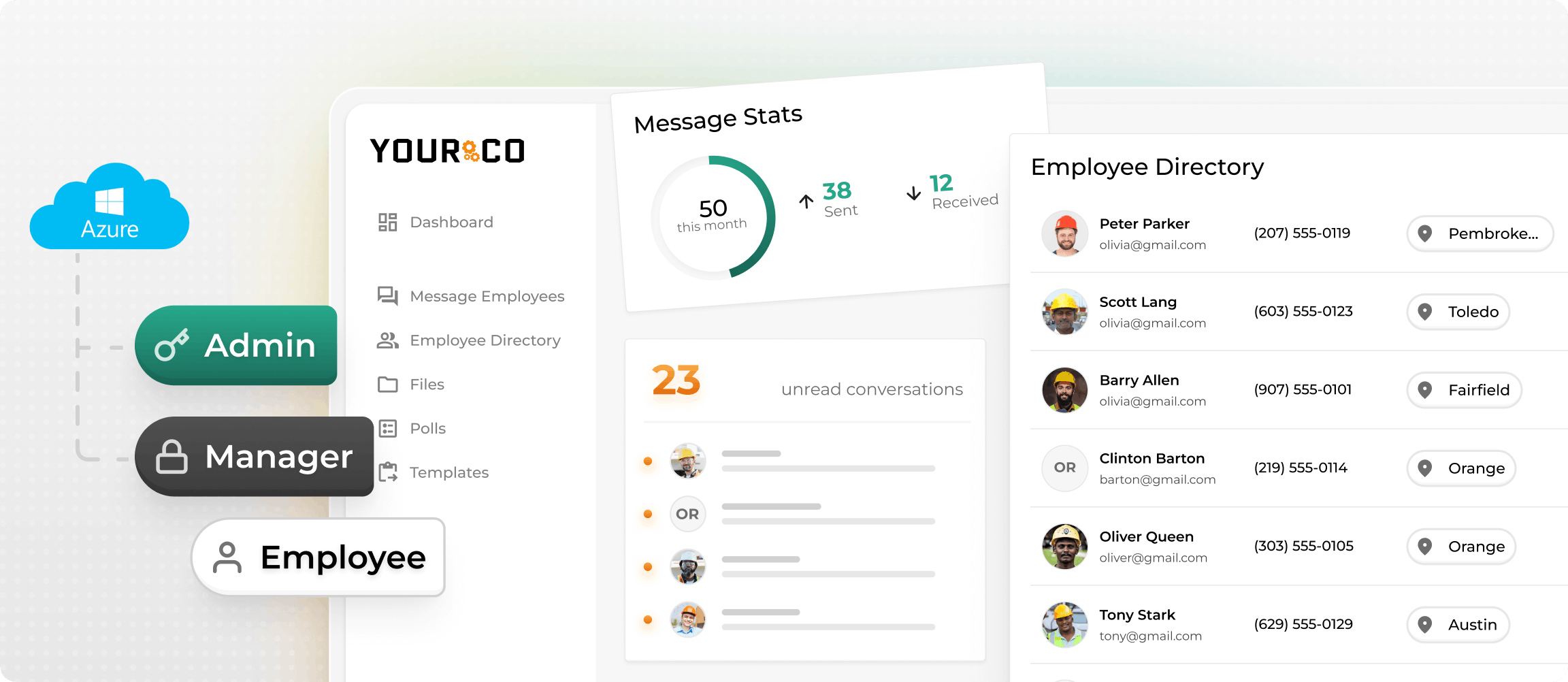
For crews on factory floors, construction sites, or delivery routes, another app to download usually isn't the answer. Yourco lets workers clock in, report call-offs, and acknowledge policy updates by texting a single keyword from any mobile phone, with no data, Wi-Fi, or app download required. Because SMS reaches workers on basic flip phones and doesn't require a company email, it's the most accessible attendance channel for non-desk, multilingual, and multi-site workforces.
Yourco also stands out in reporting. Frontline Intelligence surfaces call-off patterns, absence frequency trends, and attendance signals across locations, departments, or shifts. Delivery tracking shows which employees received and acknowledged each communication, and a real-time dashboard separates confirmed from unconfirmed workers so managers can follow up before a compliance deadline or shift start. Yourco also supports 135+ languages and dialects and syncs with 240+ HR and payroll platforms.
2. Connecteam: Mobile Tracking With GPS Controls
Connecteam delivers detailed location data and rich scheduling features. Employees clock in through a smartphone app, and GPS stamps each entry, so managers can see who was on the right job site. Managers can also assign tasks, share safety checklists, and handle shift swaps in the same interface.
3. Clockify: Straightforward Tracking on a Lean Budget
Clockify gives small businesses accurate time tracking without extra features. The generous free tier covers unlimited users, and time can be tracked from a browser, desktop widget, or mobile app. PTO approvals and location validation come as upgrade modules.
4. BambooHR: Attendance Inside a Full HR Suite
BambooHR ties attendance to the entire employee lifecycle, feeding clock-ins straight into performance dashboards, onboarding workflows, and compensation reviews. It fits best when the goal is to retire separate HR tools and consolidate.
5. Hubstaff: Remote-First Monitoring with Productivity Insights
Hubstaff provides remote teams with attendance tracking and activity metrics such as keystrokes, optional screenshots, and app usage. Hours flow automatically into payroll, and GPS confirms time spent at authorized locations. Clear privacy policies are important before switching it on.
How to Roll Out an Employee Attendance Tracker
Implementing an attendance tracker for a frontline team is different from rolling out software to an office. Workers may not have a company email, may be multilingual, and may be skeptical of new tracking systems if the communication around the change isn't clear. The seven steps below account for those realities.
- Start with a needs assessment: Define the actual failure modes before shopping for a tool: Are call-offs going undocumented? Is overtime invisible until payroll runs? Are points-based thresholds being applied inconsistently across supervisors? Tools chosen for feature lists rather than specific problems consistently underperform in implementation.
- Set clear objectives: Decide what "working" looks like before the pilot begins: fewer payroll corrections, faster coverage decisions when someone calls in sick, or defensible FMLA documentation. Vague goals produce vague results.
- Involve employees early and explain the why: Workers who understand that the system benefits them through accurate pay and clear attendance policies adopt it faster and game it less. A 15-minute explanation at the start of a shift is worth more than a dozen follow-up emails nobody reads.
- Pilot with a small team before full rollout: A single shift or department will expose edge cases (multilingual workers, workers without smartphones and offline connectivity gaps) before they become organization-wide problems. Plan for the pilot to surface issues. That's its job.
- Train supervisors and workers thoroughly: For frontline teams, training has to cover how to report a call-off, how to view an attendance record, and what happens when an employee reaches an occurrence threshold, not just how to clock in. Supervisors, in particular, need to know how to handle FMLA-protected events so they don't accidentally count against an employee's point total.
- Create clear written attendance policies: Define what counts as a call-off versus a no-call-no-show, how points are assigned and reset, and how FMLA-protected absences are handled. Informal channels (text threads, GroupMe, word-of-mouth through a coworker) should not count as official call-in procedures, and the policy should state so explicitly.
- Monitor early feedback and adjust: The most common reason attendance systems stall is that managers do not using them because the workflow is too complex. Prioritize simple user experience (UX) and adjust the rollout before bad habits form. The first 30 days tell you more about whether the system will stick than the next six months will.
Rollout continues past launch, pay attention to what managers and workers are telling you in the first 60 days, and adjust before habits are set. Yourco's survey of 150 HR leaders found that 92% believe improved communication would strengthen engagement among non-desk employees, and that a well-adopted attendance tracker is one of the most direct paths to that outcome.
Whichever system type fits best, attendance tracking only works when it reaches every worker, produces a timestamped audit trail, and turns daily data into patterns leaders can act on.
Track Attendance Across Every Shift With Yourco
Yourco is an SMS-based employee communication platform built for frontline teams, connecting operations and HR leaders to every worker on the floor so attendance tracking reaches the people running the business. No app, no company email, no Wi-Fi required.
- SMS to any mobile phone, including basic flip phones, with no app download required
- Two-way messaging for call-offs, policy acknowledgments, and shift confirmations
- AI-powered translations in 135+ languages and dialects
Yourco syncs with 240+ HRIS and payroll systems via an open application programming interface (API), automatically keeping contact lists, shift groups, and time-off data current across systems.
For multi-site operations, Enterprise Bridge enables one-way broadcasts from corporate leadership to the entire frontline, keeping every location aligned on attendance policy updates and company-wide reminders without requiring responses.
Frontline Intelligence gives HR and operations teams centralized visibility into shift confirmations, response times, and call-off activity across all locations. Leaders can generate reports on call-off patterns by site or department, track acknowledgment rates on attendance policy updates, and identify absence trends before they affect coverage.
"We use Yourco for our absence management and for sending out notices, reminders, and event announcements. It keeps everyone who needs to know informed when people are absent."
— Kyle Stover, HR Assistant, J-Lenco Inc.
After 90 days on Yourco, companies see two-way employee engagement reach 86%, the kind of sustained participation that attendance programs depend on shift after shift.
Try Yourco for free today, or schedule a demo to see the difference the right workplace communication solution can make for your company.
Frequently Asked Questions About Employee Attendance Tracking
Which tool works best if employees don't have smartphones?
SMS-based platforms like Yourco work on any mobile phone, including basic flip phones, making them the most practical option when data plans or app downloads aren't feasible. Workers report call-offs and receive policy updates through the same text channel, and managers get an acknowledgment dashboard that shows who responded, without anyone logging into an app.
How do I confirm which employees acknowledged my messages?
Standard SMS delivery receipts only confirm that a message reached a device; they don't confirm the employee saw it. For compliance-critical communications such as policy updates, safety alerts, or attendance policy acknowledgments, the defensible approach is two-stage tracking: delivery confirmation plus an explicit reply from the employee. Platforms like Yourco log each reply with a timestamp and show a real-time dashboard of confirmed versus unconfirmed employees, so managers can follow up with non-responders before a shift starts or a compliance deadline passes.
What should a frontline attendance reporting dashboard include?
A useful frontline attendance dashboard goes beyond clock-in and clock-out logs. The core views to look for are a real-time who's-on-site view, attendance point totals per employee with threshold alerts, call-off frequency by day of week or department, overtime accumulation alerts, and FMLA-protected absence flags that prevent protected events from counting against employee point totals. Reporting should also allow absence patterns to be queried across location, shift, or department.
How do I decide between GPS and biometric verification?
Pick GPS when location matters, such as construction, delivery, or field service. Pick biometric when the priority is preventing buddy punching inside a fixed facility. Some organizations use both, applying GPS for mobile crews and biometrics for a central site.
Can I switch attendance tools later without losing historical data?
Most platforms let users export attendance records as comma-separated values (CSV) files or connect via open APIs. Before signing any contract, confirm that raw time data can be downloaded in bulk, so there's no lock-in if needs change down the road.