Manual scheduling eats into every other part of a manager's week. According to the Legion 2025 State of the North American Hourly Workforce report, 59% of managers spend three or more hours every week on scheduling tasks alone, and 39% still rely on paper or basic software to build their rosters.
Automated scheduling platforms solve the planning side of that equation. Getting the roster to workers who don't check email or open apps is a separate problem, and it's usually where rollouts break down. This guide walks through how automated scheduling works, why it matters now, and which tools deliver the best results.
TL;DR
- Automated scheduling software uses rules, demand forecasts, and AI to build conflict-free rosters in seconds.
- The biggest gap in most scheduling rollouts is delivery to workers who don't check email or log in to apps.
- Compliance requirements are tightening across jurisdictions, and predictable scheduling laws now carry multi-million-dollar penalties.
- Seven leading tools each fit different operations, team sizes, and compliance needs.
- SMS-based platforms like Yourco deliver schedules and shift changes to any mobile phone, so updates actually reach the floor.
What Is Automated Scheduling & How Does It Work?
Automated scheduling is software that takes the rostering work off a manager's plate. Instead of wrestling with spreadsheets, the manager feeds the system the rules that matter (labor laws, wage budgets, employee availability, skill sets, and demand forecasts), and it generates a conflict-free schedule in seconds. The platform learns from every approved change, so the next roster gets smarter.
A typical workflow covers three steps:
- Set up. Import or sync overtime limits, PTO requests, store traffic patterns, and each worker's preferred hours.
- Create the schedule. The system evaluates thousands of shift combinations and picks the best fit for coverage, cost, and fairness.
- Share with the team. Final rosters are delivered to employees via text message, web link, or kiosk. If someone calls off, the engine rebalances the day and notifies the new assignee.
Manual scheduling, by contrast, breaks at almost every step. Updating a single spreadsheet can take hours and still leave overlap, understaffing, or breaches of break rules.
Understanding different types of shifts matters when setting up automated scheduling rules that accommodate various rotations. Manual methods also struggle to capture last-minute availability changes, leaving managers calling down the list to find coverage while employees wonder whether the shift change was ever communicated at all.
Why Automated Scheduling Matters Now
In December 2025, Starbucks agreed to pay nearly $39 million to resolve Fair Workweek violations in New York City, one of the largest settlements of its kind. Penalty structures across other jurisdictions compound quickly on a per-violation, per-employee, per-day basis.
With workforces more distributed, teams are increasingly mobile or split across multiple sites, and workers expect real-time updates they can check between tasks, not an email attachment they may never open. Automated systems enforce compliance rules as they build the roster and update everyone as soon as anything changes.
According to Deloitte's 2025 Manufacturing Industry Outlook, most large businesses with hourly employees have now invested in advanced workforce management software, and the global WFM market continues to grow.
Industries seeing the biggest benefits are those where shifts never stop, and coverage gaps hit customer experience hard: retail, healthcare, hospitality, logistics, and manufacturing. For round-the-clock operations, our 24-hour coverage shift schedule guide covers best practices on maintaining continuous staffing.
Key Benefits of Automated Scheduling
Automated scheduling replaces manual rostering with a system that plans shifts in seconds and keeps everyone informed. The benefits compound when the scheduled delivery actually reaches the workers who need it.
Cut Admin Time and Costs
Automated scheduling software takes the rostering work off managers' plates by letting an algorithm match availability, rules, and demand. Managers reclaim hours each week to focus on coaching, safety, and wage accuracy instead of copy-pasting cells and chasing shift confirmations. According to the Legion 2025 report, only 11% of managers currently use AI to build schedules, meaning the majority are still absorbing this administrative burden manually.
Reduce Conflicts and No-Shows
Automated systems send instant shift updates and reminders directly to workers. Self-service features let employees swap or offer shifts within preset rules, cutting the last-minute scramble for coverage.
Internal employee email typically reaches only a fraction of the intended audience, whereas SMS regularly achieves a 98% open rate, an industry-standard benchmark. For shift reminders and schedule changes, that gap determines whether workers show up informed or not at all.
For shift reminders and schedule changes, that difference determines whether workers show up informed or don't show up at all. Clear shift-change communication protects against those issues.
Strengthen Compliance Protection
Automated scheduling tools flag conflicts or block publishing illegal rosters. Overtime caps, meal-break requirements, rest periods, and age-based work limits are easy to overlook when juggling dozens of shifts manually. The compliance landscape is increasingly complex.
As of 2025, Greenberg Traurig describes a “patchwork of predictive scheduling laws” governing scheduling in jurisdictions including New York City, Seattle, Chicago, Los Angeles, San Francisco, and, effective July 1, 2025, unincorporated Los Angeles County.
Most of these laws require schedules to be posted 14 days in advance and mandate predictability pay when schedules change after posting. Electronic delivery of shift notices is specifically required in some jurisdictions and is a direct factor in the Starbucks enforcement action referenced earlier.
This information is for general awareness only. For specific compliance guidance, consult with qualified legal professionals.
Strengthen Cost Control
Many platforms pull in sales data, delivery volumes, or patient counts to predict workload, then staff each hour just enough to meet it. By aligning labor to demand, companies avoid paying wages for idle time while still protecting service levels.
By aligning labor to demand, companies avoid paying wages for idle time while still protecting service levels. Turnover compounds these costs. Replacing a skilled frontline worker in industries like manufacturing can cost tens of thousands of dollars once recruiting, training, and lost productivity are factored in. Better scheduling, with clearer communication around it, is one of the most practical levers on that number.
Reach Mobile and Frontline Teams
Frontline employees rarely check email, and many don't have corporate email accounts at all. Modern scheduling tools deliver rosters through mobile-friendly dashboards or simple text links, but the most reliable channel for frontline workers is SMS.
According to a Yourco-commissioned survey of 150 HR leaders, 64% report it's much harder to reach frontline employees than desk-based employees, and better communication tools consistently rank among the highest-impact fixes. SMS-based platforms like Yourco close that gap by delivering schedule updates, shift reminders, and training notifications directly to any mobile phone, including basic devices, without requiring app downloads or corporate credentials.
Streamline Time-Off Management
Paid time off (PTO) requests, sick calls, and leave balances are built into the automated scheduling system, eliminating double bookings and accidental understaffing. Workers can submit requests and receive confirmations via text without an app login, an email chain, or a manager playing phone tag at 6 AM when someone calls off. Strong call-off hotline workflows make this process both auditable and fast.
Create a Fairer Employee Experience
Automated scheduling applies the same rules to everyone, spreading weekend and night shifts evenly and, where possible, recognizing individual scheduling preferences. Fairness matters for retention.
SHRM research on frontline workforce scheduling highlights that several of the most effective retention strategies for hourly workers relate directly to scheduling, including flexible schedules, consistent hours, employee input, predictable shifts, and advance notice, yet many employers still do not fully implement these practices.
The 7 Best Automated Scheduling Tools for 2026
The right automated scheduling platform depends on the team's needs and tech environment. Some tools are scheduling engines that build the roster, and others are communication layers that ensure workers see and confirm what gets built. Most operations need both.
1. Yourco
Yourco is purpose-built for teams that rely on phones rather than computers, making it a fit for frontline environments where quick schedule updates, shift reminders, and accessibility matter more than complex forecasting. It serves as the communication layer that sits atop scheduling and HRIS systems, ensuring schedule changes and shift reminders reach workers on the floor, on the road, or on the line.
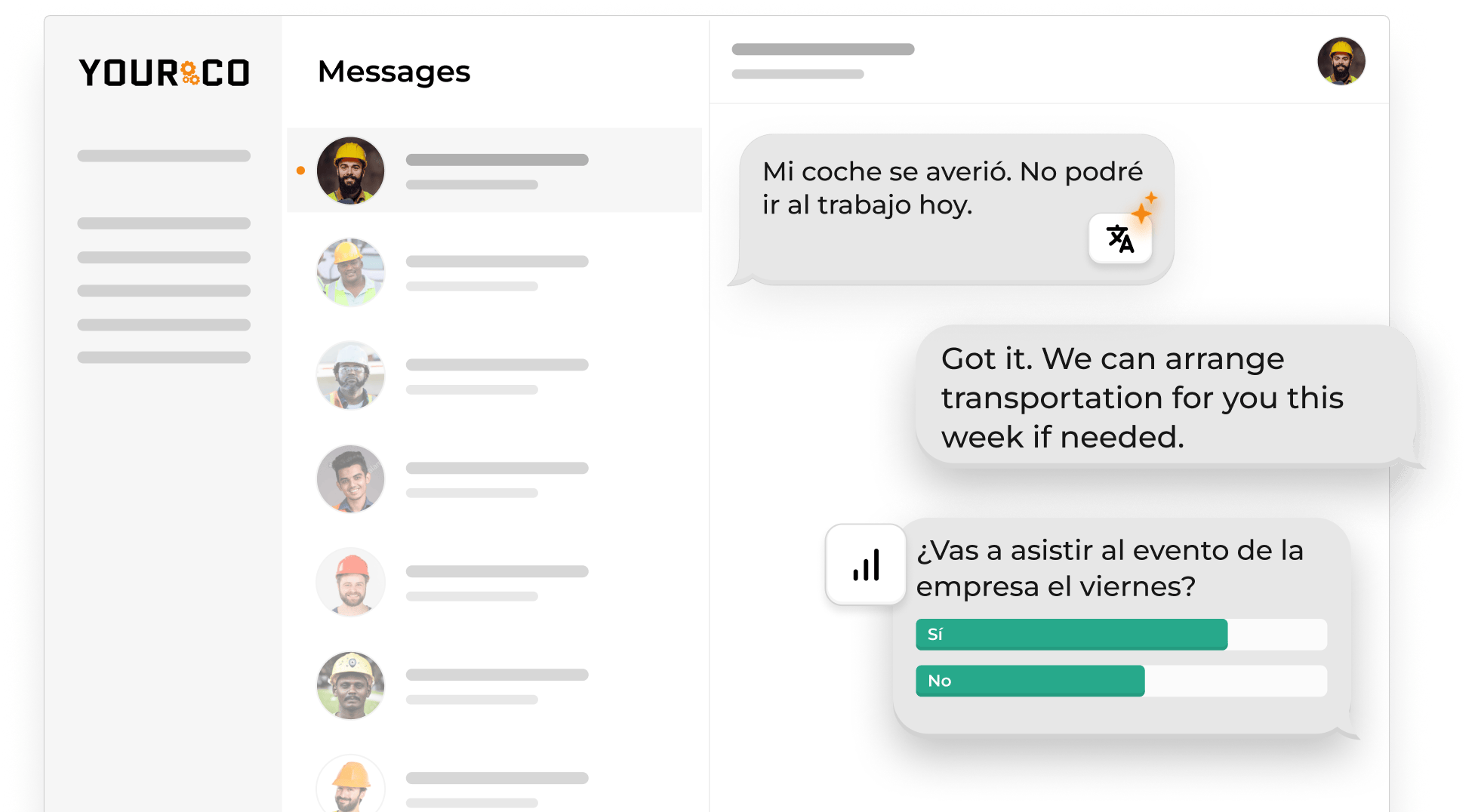
Where scheduling tools stop at generating the roster, Yourco gets the roster in front of every worker through two-way SMS that works on any phone, including basic flip phones. No app download, no login, no corporate email required. Workers can reply to confirm a shift, report a call-off, or ask a question, and managers get a documented record of every exchange.
Key features:
- Two-way SMS schedule delivery and shift updates, no app download required
- Works on any mobile phone, including basic flip phones
- Real-time shift confirmation and acknowledgment tracking
- AI-powered translations in 135+ languages and dialects
- 240+ HRIS and payroll integrations that sit alongside existing scheduling tools
Ideal for: logistics, healthcare, retail, construction, multilingual teams, and any operation where schedule changes need to reach workers who aren't checking apps or email.
2. Deputy
Deputy uses AI to automatically build schedules that comply with labor laws, checking daily hour limits, meal breaks, and budget constraints.
Key features:
- AI-driven, labor-law-compliant scheduling
- Demand forecasting using sales and traffic data
- Staff can swap shifts and clock in via phone
- POS and payroll integrations
Ideal for: retail and hospitality chains, as well as multi-location businesses.
3. When I Work
When I Work offers a simple drag-and-drop interface for building schedules.
Key features:
- Drag-and-drop scheduler
- Employee self-managed swaps
- Time-off requests
- Free tier for up to 75 users
Ideal for: small to midsize teams.
4. Humanity
Humanity provides enterprise-level features, including AI forecasting, predictive scheduling, and detailed analytics.
Key features:
- Predictive scheduling and AI forecasting
- Compliance and fatigue risk management
- Scenario modeling and executive dashboards
Ideal for: enterprises, large hospitals and national retailers.
5. Shiftboard
Shiftboard handles round-the-clock operations, where compliance errors can cause serious problems.
Key features:
- Compliance checks and credential tracking
- Fatigue and rotation management
- Self-service shift trades
Ideal for: healthcare, manufacturing, public safety, 24/7 operations.
6. Paycor
Paycor combines automated scheduling with broader HR features like payroll and onboarding.
Key features:
- AI-assisted scheduling and shift optimization
- Labor-law compliance checks
- Integrated payroll and HR modules
Ideal for: mid-sized businesses looking to unify HR, payroll, and scheduling.
7. UKG
UKG delivers enterprise-grade scheduling with built-in compliance, forecasting, and workforce analytics.
Key features:
- Advanced forecasting and compliance-based scheduling
- Integration with the full HCM suite
- Fatigue management and credential tracking
Ideal for: large enterprises with complex labor rules and compliance requirements.
Get Every Schedule Change in Front of Every Worker With Yourco
Yourco is an SMS-based employee communication platform built for frontline teams. It sits on top of any scheduling engine and delivers shifts, changes, and reminders to every worker on the floor, on the road, or on the line, without an app, email, or Wi-Fi.
- SMS to any mobile phone, including basic flip phones, with no app download required
- Two-way messaging for shift confirmations, call-offs, and schedule questions
- AI-powered translations in 135+ languages and dialects
Yourco syncs with 240+ HRIS and payroll systems via open application programming interface (API), so approved time-off requests, shift groups, and wage data flow between systems automatically.
For multi-site operations, Enterprise Bridge enables one-way broadcasts from corporate leadership to the entire frontline, keeping every location aligned on schedule policies and company-wide reminders without requiring responses.
Frontline Intelligence provides HR and operations teams with centralized visibility into shift confirmations, response times, and schedule acknowledgment activity across all locations. Leaders can generate reports on which sites respond fastest to schedule changes, track acknowledgment rates for shift-start reminders, and spot disengagement signals before they surface as no-shows or turnover.
"Yourco has been huge for us, especially during the weather crisis. We were able to keep our employees safe and make sure everyone was notified of updates in a timely manner."
— Scott Pfantz, Operations Manager, Nufarm - Alsip
After 90 days on Yourco, companies see two-way employee engagement reach 86%, the kind of sustained participation scheduling programs depend on shift after shift.
Try Yourco for free today, or schedule a demo to see the difference the right workplace communication solution can make for your company.
Frequently Asked Questions About Automated Scheduling
What is automated scheduling software?
Automated scheduling software is a digital planner that builds and updates rosters by matching demand forecasts, worker availability, and labor rules. Instead of manually arranging shifts in a spreadsheet, the system evaluates the options and produces a conflict-free schedule in seconds, then pushes it to employees through whichever channel they actually check.
Why not use Excel or Google Sheets for scheduling?
Spreadsheets can work for small teams with predictable hours, but once shifts change frequently or compliance rules tighten, manual spreadsheets become a time sink. They also can't push updates directly to workers' phones, which means last-minute changes go unseen until someone shows up for the wrong shift or not at all.
What makes a good scheduling tool?
A useful scheduling tool is easy to use, reaches employees wherever they work, and automatically enforces overtime and meal-break rules. For frontline teams, reaching employees specifically means SMS delivery rather than email, app notifications, or a bulletin board post.
Can automated scheduling improve employee satisfaction?
Yes, when workers can easily indicate their availability or swap shifts, they gain more control over work-life balance and experience fewer last-minute scrambles. SMS-based platforms like Yourco also make schedule changes visible without requiring workers to download an app or log into a portal.
Is there free scheduling software?
Several platforms offer no-cost tiers for small crews, though they may cap user counts, lack compliance safeguards, or charge extra for text alerts. A free Yourco plan is also available for smaller teams that need SMS schedule delivery without a full rollout.
How do I choose the right tool for my business?
List the must-have rules (compliance, multi-site coordination, language needs), demo a few products, pilot with one department, and measure time saved against the current process. One question matters more than the rest: does the tool actually get schedules in front of the workers who need to see them, or does it assume they'll log in to check?