



Employee Survey Distribution
Only 20% of employees worldwide were engaged at work in 2025, according to Gallup's 2026 State of the Global Workplace report. Frontline workers in manufacturing, construction, retail, healthcare, and logistics, who don't spend their days behind desks or computers, sit at the center of that engagement problem because most lack the channels their office-based colleagues use to stay informed and connected. These communication challenges affect engagement, retention, and, in some roles, safety.
Since frontline workers often lack access to traditional communication channels, structured tools like surveys provide a reliable way to share feedback and raise concerns. The challenge for HR teams isn't whether to survey frontline employees, but how to actually reach them with a survey they will complete.
| Method | How it works | Limitations for frontline | Best for |
|---|---|---|---|
| Survey link sent to inbox | Many frontline workers lack a company email; long forms don't render on mobile | Office-based teams | |
| QR codes | Printed or digital code scanned with phone camera | Requires a smartphone with a camera; printing and posting add overhead | On-site, in-person events |
| Social media | Survey link posted to company channels | Shift workers rarely follow corporate accounts; no delivery guarantee | Public-facing campaigns |
| Website integration | Embedded form on the company website | Workers don't visit public sites for internal surveys | Customer surveys |
| Text messaging | Survey link sent directly via SMS | Not significant; reaches any phone, including flip phones | Frontline and shift-based workforces |
What Are the Different Methods of Survey Distribution?
Employee survey distribution is the process of delivering surveys to your workforce in a way that ensures everyone who needs to respond can actually access and complete them. For frontline teams, the method you choose determines whether you get representative data or a skewed picture from whoever happened to have access to a computer that day.
The five most common methods each carry distinct tradeoffs for frontline workforces:
The Two Most Common Methods
Email remains the standard for office-based teams but breaks down outside desk-based roles. Frontline employees rarely sit at a computer, and many don't have a company email address at all. Even when they do, long survey forms designed for desktop screens don't fit how someone completes a survey on a phone during a quick break. The reach problem is well-documented: only 43% of frontline employees consistently receive the communications their companies send them, and only 36% of HR leaders say their current communication app is effective, according to a Yourco-commissioned survey of 150 HR leaders. When the communication channel itself fails, the survey on top of it has no chance.
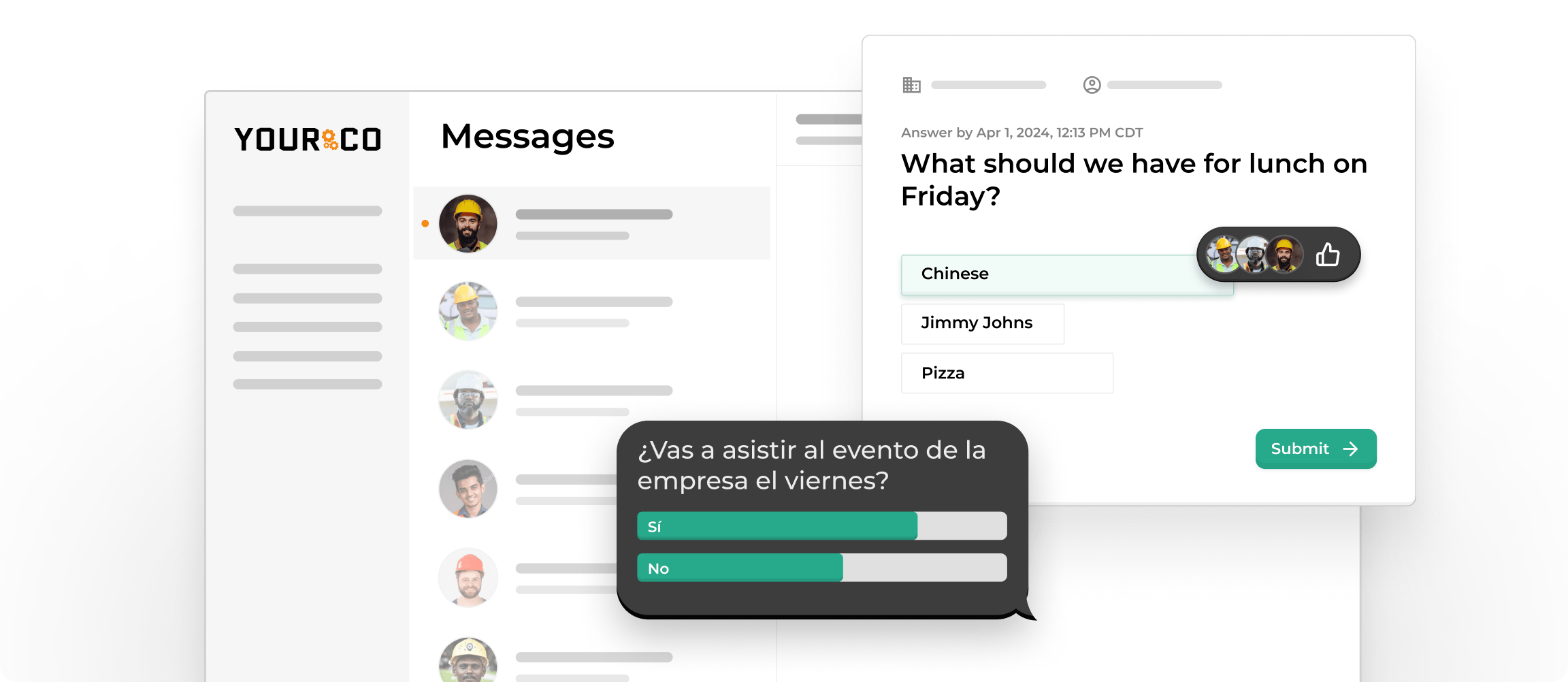
Text messaging cuts through the noise that bogs down the other methods. SMS works on any phone, including basic flip phones without internet access, making it accessible to workers who may not have computers, corporate email, or reliable data. Workers receive survey links via text and can respond during a break without logging into email, using complex systems, or remembering passwords. 62% of Paper + SMS respondents completed a short employment survey, compared to 48.65% for Paper + Web and 38.10% for Paper Only, according to a peer-reviewed study published in the Journal of Survey Statistics and Methodology. The study also found that 30% of SMS respondents completed the survey within five minutes of receiving it. HR teams can send the right survey to the right worker segment by location, shift, department, or role, with confirmed delivery and response without requiring email or an app download.
What Types of Employee Surveys Can You Distribute via SMS?
SMS-based survey distribution works for virtually any survey you'd traditionally send by email, with one important difference: your entire workforce can actually access and complete it. From quick pulse checks to full annual reviews, text-based delivery ensures frontline employees participate at the same rates as their desk-based colleagues. The most common formats include:
- Pulse surveys: Brief, focused questions sent weekly or monthly to capture real-time sentiment and catch early signals of disengagement before they escalate. A three-question pulse takes minutes to complete on a break, and pulse data fed into Frontline Intelligence can surface sentiment trends across locations before they show up as turnover.
- Employee engagement surveys: Longer engagement surveys measure overall job satisfaction and workplace culture, typically conducted quarterly or annually. SMS distribution ensures every employee receives them regardless of email access, and workers can resume on their phone later if needed.
- Safety incident reports: Real-time safety reporting via SMS lets workers text incident details and photos directly to your company number, creating timestamped reports that support insurance claims and workplace investigations.
- Onboarding feedback surveys: New hire surveys sent at 30, 60, and 90 days evaluate your onboarding process and reach employees who start work before receiving company email credentials.
- Benefits and policy acknowledgments: Open enrollment reminders, benefits education, and policy updates are delivered via SMS, with employees confirming receipt by replying "YES." All responses are logged and timestamped for compliance documentation, and Yourco translates questions and responses across 135+ languages and dialects.
- Training effectiveness surveys: Post-training SMS surveys capture immediate feedback while the material is fresh, helping you adjust training content before rolling it out to additional teams.
- Exit surveys: SMS-based exit surveys reach employees who've already lost access to company email but can still receive texts on their personal phones, capturing honest insights that might otherwise be lost.
What Are the Best Practices for Survey Distribution?
How you distribute your survey matters just as much as what questions you ask. These best practices help you maximize participation and gather more accurate insights from your entire workforce, particularly from shift-based and location-dispersed frontline teams.
Segment Your Audience
Not every survey needs to go to every employee. Segment your workforce by department, location, shift, or role to ensure people receive surveys relevant to their work experience. A night-shift warehouse worker shouldn't receive questions about office culture, just as a corporate employee doesn't need questions about shop-floor safety. Targeted surveys feel more personal and demonstrate that you understand each team's specific context. They also produce cleaner data you can act on by site or department.
Time Your Surveys Strategically
When you send your survey, it can significantly impact response rates. Avoid sending surveys during busy periods or major deadlines. For shift workers, consider the timing of different shifts: first-shift employees might respond better to messages sent mid-morning, while second-shift workers may engage more with surveys sent early afternoon. If you're surveying multiple shifts, stagger your distribution times to meet each group when they're most likely to engage.
Communicate the Purpose
Before launching your survey, tell employees why you're conducting it and how you'll use their feedback. When employees understand the purpose and potential impact, they're more motivated to participate. Follow up after the survey closes to share key findings and actions you're taking based on results. Closing the feedback loop is essential: workers who see their input lead to change are far more likely to participate in future rounds.
Send Reminders, but Don't Spam
One reminder can significantly boost response rates, but multiple follow-ups can feel intrusive. Send a single reminder 2 to 3 days before the survey closes to employees who haven't completed it yet. Keep the reminder brief and emphasize the deadline. Avoid sending more than two follow-ups total, as survey fatigue actively decreases future participation.
Make it Mobile-friendly
Most frontline employees will complete surveys on their phones, so your survey must be optimized for mobile devices. Use responsive design that adapts to different screen sizes. Keep questions concise and use simple answer formats, such as rating scales or yes/no options, that are easy to tap on a small screen. Test your survey on multiple device types before launch to ensure a smooth experience for all respondents.
Provide Multilingual Options
If your workforce speaks multiple languages, offer your survey in those languages. When employees can respond in their preferred language, you get more accurate and thoughtful feedback. This is especially important for safety surveys and policy acknowledgments, where language barriers could impact understanding. SMS-based platforms like Yourco automatically translate surveys into 135+ languages and dialects, so every employee receives questions in their preferred language without manual routing.
Keep Surveys Accessible
Ensure your distribution method works for all employees: those without company email addresses, those who work in areas with limited internet connectivity, and those with older phone models. Text message distribution reaches employees on any mobile phone and doesn't require data or internet access for basic SMS responses.
How Do You Distribute a Survey Questionnaire Online?
Successful employee survey distribution aligns the process to your workforce's actual work environment. Follow these steps to gather meaningful feedback from frontline and office-based employees alike:
- Set your business objectives: Define why you're creating the survey and how the results will benefit both the organization and its employees. Surveys without a clear purpose produce data no one acts on, and workers notice when nothing changes.
- Draft your question list: Build questions aligned with your objectives across satisfaction, engagement, communication, safety, and other priorities. Keep questions specific to the audience receiving them; generic questions produce generic answers.
- Distribute the survey with Yourco: While there are many survey distribution platforms, Yourco includes frontline workers through SMS-based delivery. Schedule and automate text messages so workers can open and respond anytime. The platform confirms delivery and tracks responses without read receipts or app-based notifications, giving HR teams accurate participation data by location and shift.
- Collect and analyze responses: Track completion rates and analyze feedback by sentiment to identify trends and areas for improvement. Response data broken down by department or location is significantly more actionable than aggregated totals.
- Reflect and adjust accordingly: Use insights to reinforce successful practices or to address issues such as communication breakdowns and workplace culture concerns. Share what you found and what you're doing about it. This step determines whether your next survey receives the same level of participation or a fraction of it.
How To Build an Effective Employee Survey?
Frontline employees are more likely to complete surveys built for someone with five minutes between tasks rather than someone at a desktop computer. The fundamentals:
- Start with clear objectives: Define what you want to learn before drafting a single question, whether you're measuring satisfaction after a policy change, investigating turnover in specific departments, or gauging communication effectiveness.
- Keep your survey concise: Aim for 5 to 10 minutes for general surveys; pulse surveys should be shorter still. Workers who see a long survey on their phone are more likely to abandon it before finishing.
- Use simple, direct language: Replace jargon like "How would you rate the efficacy of our current communication protocols?" with "How well does our company keep you informed?"
- Balance question types: Use rating scales and multiple-choice with a small number of open-ended items to prevent abandonment. Skip logic or branching responses can direct workers to the questions most relevant to their role.
- Ensure anonymity when appropriate: For sensitive topics, be explicit about how responses are stored, who sees them, and what protections are in place. For onboarding or exit surveys, identified responses may help with follow-up.
- Test before launch: Pilot the survey with a small group, time completion, and test on multiple mobile device types before full distribution.
- Include clear instructions: State how long the survey takes and explain how you'll act on the feedback. Surveys without a stated purpose attract fewer participants and elicit fewer honest responses.
What are the Participation Rates for Employee Surveys?
Employee survey participation rates vary significantly based on how accessible the survey is to each worker. Frontline turnover tends to be meaningfully higher than office turnover, particularly in the first year of employment, making missed engagement signals from the frontline more costly than from headquarters.
- Enterprise baseline (predominantly office-based): Large enterprises with reliable computer and email access typically report high census survey response rates and solid pulse survey participation, because the entire workforce has direct, frictionless access to the distribution channel.
- Frontline reality: Many manufacturers don't conduct an engagement or culture survey at all, and of those that do, only a fraction of frontline workers actually participate. The shortfall reflects access barriers (no company email, no shared computer, no time during a shift) rather than disinterest.
- When access barriers are removed: Companies that combine email access for office staff with mobile-first or text-based access for production workers consistently see frontline participation rise to levels that match or exceed office staff. Shift-specific communication and local champion networks further close that distance.
When workers can't complete surveys during their shift on a device they actually have access to, participation drops because the method fails them.
Yourco's SMS platform helps close that distance by:
- Reaching employees on their personal devices with confirmed delivery
- Automating scheduling and reminders by shift and location
- Targeting specific departments or locations with the right survey
- Allowing two-way texting so workers can respond or ask questions
- Working on any phone, including basic flip phones without data plans
- Logging and timestamping responses for compliance documentation.
Survey workflows by role and location are covered in our detailed demo.
How To Increase Survey Response Rates
Low frontline survey participation usually comes from access barriers. These tactics address the real barriers that keep workers from completing surveys, particularly across shift-based and multi-location workforces:
| Tactic | How to apply | Why it works |
|---|---|---|
| Emphasize brevity upfront | State the expected completion time ("This 3-minute survey") so employees know the commitment before they open it | Workers who don't know how long a survey takes are more likely to abandon it partway |
| Lead with easy questions | Start with simple items to build momentum; save complex or open-ended questions for later | Reduces early abandonment, especially on mobile |
| Show progress | Add a progress bar to longer surveys | Gives workers a clear sense of how far they've come and how much remains |
| Incentivize thoughtfully | Offer modest incentives but emphasize that honest feedback drives real change | Increases participation without undermining the trust, producing candid responses |
| Close the feedback loop | Share results and the actions taken based on them | Workers who see input lead to change participate in future rounds; those who don't, won't |
| Use management support | Equip frontline managers with talking points to encourage participation | Manager endorsement noticeably improves response rates in hourly and shift-based environments |
| Remove barriers to access | Use SMS distribution that doesn't require logins, app downloads, or computer access | Eliminates the password and shared-device friction that loses a significant portion of respondents |
How does Frontline Intelligence turn Survey Data into Actionable Insights?
Survey distribution gets feedback. Frontline Intelligence is what makes that feedback operational. It consolidates survey responses, poll results, and daily SMS communications to surface sentiment trends and workforce risks across all locations, providing HQ visibility without relying on local managers to escalate issues. Specifically, Frontline Intelligence:
- Spots disengagement signals: Surfaces shifts in tone and response patterns from everyday SMS exchanges, so HR teams catch attrition risk before it shows up as turnover
- Flags safety and conflict indicators: Scans communications for high-risk language so site leaders can act fast and mitigate compliance risk
- Delivers site-level insights to HQ: Surfaces real-time, location-specific signals so corporate teams maintain visibility across all sites without depending on local escalation
- Powers natural-language reporting: Ask any question to analyze call-offs, uncover absence causes, and export customized attendance or scheduling reports formatted the way your team needs them
Together, these capabilities turn survey distribution into early-warning workforce intelligence, and 88% of HR leaders agree that better communication tools reduce employee churn, according to the same Yourco-commissioned survey of 150 HR leaders.
Yourco: The All-Inclusive Survey Distribution Platform
Reaching your entire frontline workforce with employee surveys drives better insights and stronger retention, but only if every worker can actually receive, access, and complete the survey you send. Yourco is built specifically for this problem: an SMS-based platform that delivers surveys to any mobile phone, including basic flip phones, with no app download or corporate email required.
Core features that make frontline survey distribution work:
- SMS-based survey delivery with confirmed delivery and response tracking; no read receipts needed
- Automated scheduling by shift, location, department, or role
- Two-way messaging so employees can respond and ask questions
- Support for external forms or native SMS survey formats
- AI-powered translation across 135+ languages and dialects
- Document and file sharing through secure, PIN-protected links
- Compliance-ready response logging and audit trails
Yourco integrates with 240+ HRIS and payroll systems, so employee data syncs automatically. Teams don't need manual roster uploads or duplicate data entry when they launch a new survey cycle.
For organizations with headquarters managing multiple frontline locations, Enterprise Bridge lets corporate and senior leadership broadcast policy updates, survey launch announcements, and follow-up communications to every site simultaneously, while local managers maintain their own two-way conversations with their teams.
Specifically for survey programs, Frontline Intelligence takes the data further. It consolidates survey responses, poll results, and daily SMS communications to surface location-level sentiment trends and workforce risks, providing HQ teams with visibility across all sites. Survey data becomes a real-time source of workforce insight alongside completion metrics.
"Yourco has helped to change the way we communicate at McCarthy Auto Group. We have nearly 700 employees and 80% are non-desk based, communication is a challenge. Yourco provides a quick easy way to reach everyone within our organization and a secure way for employees to reach HR and leadership without a computer."
– Felisha Parker, VP Human Resources, McCarthy Auto Group
After 90 days on Yourco, companies see two-way employee engagement reach 86%.
Try Yourco for free today, or schedule a demo to see the difference the right workplace communication solution can make for your company.
Frequently Asked Questions About Employee Survey Distribution
How do I send surveys to employees who work on the factory floor?
Send surveys via text message. SMS works on any phone, requires no email or app download, and lets workers respond quickly during a break without leaving their station or sharing a computer. Yourco's survey distribution feature schedules and sends surveys directly to every frontline employee, with confirmed delivery and response tracking so you can see who has and hasn't completed the survey by location or shift.
Can employee surveys be mandatory?
Most surveys are voluntary and anonymous, but some may be mandatory depending on organizational policies, the type of survey, or state and local requirements. Regardless of whether participation is required, using an inclusive distribution method such as SMS ensures that every employee can access and complete the survey without a computer, a company email address, or a corporate device.
What's the difference between a pulse survey and an engagement survey?
- Pulse survey: Short (under 10 minutes), sent frequently (weekly or monthly) to capture real-time sentiment and flag emerging issues before they escalate.
- Engagement survey: Longer, conducted quarterly or annually. It provides a full view of workplace culture, motivation, communication, and retention drivers across the organization.
Both formats work via SMS distribution and can feed into Frontline Intelligence to surface trends over time.
What are the best times to survey employees?
Survey timing depends on the type of survey and your workforce's schedule. Engagement surveys are typically quarterly; pulse surveys work best weekly or monthly. Onboarding and training surveys should align with key milestones in the employee lifecycle, and exit surveys are most effective before a departing employee loses system access. For shift-based teams, stagger distribution times to reach each shift when workers are most likely to engage, such as mid-morning for first-shift teams and early afternoon for second-shift workers. Avoid sending surveys during peak production hours or known busy periods.
What can be used as a platform for distributing your survey?
For companies with frontline employees, Yourco uses SMS to reach workers regardless of whether they have a company email or smartphone. The platform supports distribution via SurveyMonkey, Google Forms, or native SMS surveys, with built-in automated scheduling and response tracking. Multilingual delivery is also included. This helps you get representative data across your entire workforce, rather than only from whoever happened to be near a computer.
How do you analyze survey results across multiple locations?
Analyzing survey data across multiple sites requires location-level breakdowns to identify which sites are trending toward disengagement, elevated safety risk, or rising turnover before these problems become patterns. Frontline Intelligence consolidates survey responses, poll results, and daily SMS communications to surface sentiment trends and retention risks by location, department, or custom group. HQ teams get visibility across all sites simultaneously, and AI-powered reporting lets you ask specific questions about call-offs, absence causes, or scheduling patterns and export results in the format your team needs. This turns survey distribution from a data-collection exercise into an early-warning system for workforce risk.